
GoHighLevel · Product releases
GoHighLevel Events: what the beta can and cannot do yet
HighLevel has shipped a new product area called Events, and it is not another calendar. GoHighLevel Events sells tickets, holds capacity, issues QR codes and checks people in at the door, inside the same sub-account the contact already lives in. It is still in beta.
This is written from HighLevel's own help article and changelog, because there is almost nothing else: one Reddit thread, six walkthroughs with a few hundred views between them, and a ring of blogs paraphrasing each other. Everything below is sourced or marked unconfirmed.
What GoHighLevel Events is, and why it is still beta
Events is a first-party event manager inside a sub-account. You create a Ticketed or an RSVP event, publish a page with Details, Schedule and Checkout tabs, take registrations, and check people in on the day. HighLevel's help article on creating and managing Events is the fullest description of it, last modified 11 August 2026.
The status matters more than the feature list. It moved from a private beta, where an agency had to send HighLevel a Location ID to be let in, to self-serve availability in Labs for every agency in the first half of August 2026. This is HighLevel's first real event ticketing product, and it is not finished.
How to switch it on in Labs
- In the agency view, open Agency Settings, then Labs, then Sub-Account, and find Events.
- Enable it for every sub-account or only the ones you choose. HighLevel Labs also controls whether a sub-account can see the toggle at all.
- Open the sub-account and look in the sidebar, then read the paragraph below before you go hunting.
The Events changelog entry puts it under Memberships. The help article puts it under Marketing. Both are HighLevel's own documents and they contradict each other, most likely because the navigation moved during the beta and one of them lagged. Look in both places, and trust your own sidebar over anything written about it, this post included.
What the feature actually does once it is on
- Two event types. Ticketed for paid or free tickets with inventory, and RSVP events for a confirmation with no payment step. The type locks once the event is created.
- Capacity and deadlines. One total capacity across all ticket types, 0 for unlimited, and a registration deadline that defaults to the event start.
- Coupons. Percentage discounts only, with usage limits, scoped to Events rather than the rest of the sub-account.
- A registration form. First name, last name and email are locked as required. Custom fields and a terms acceptance sit on top.
- QR code check-in. On by default for in-person events and gated by payment status, run through the HighLevel mobile app according to the changelog.
- Workflow triggers. Register and check in both fire automations, with branching on event, ticket and check-in data. No help article names the triggers, so find them in the builder.
- A page you can style and embed. Reorderable sections, speakers and sessions, a custom CSS editor with live element selection, and embedding into a funnel or an outside site.
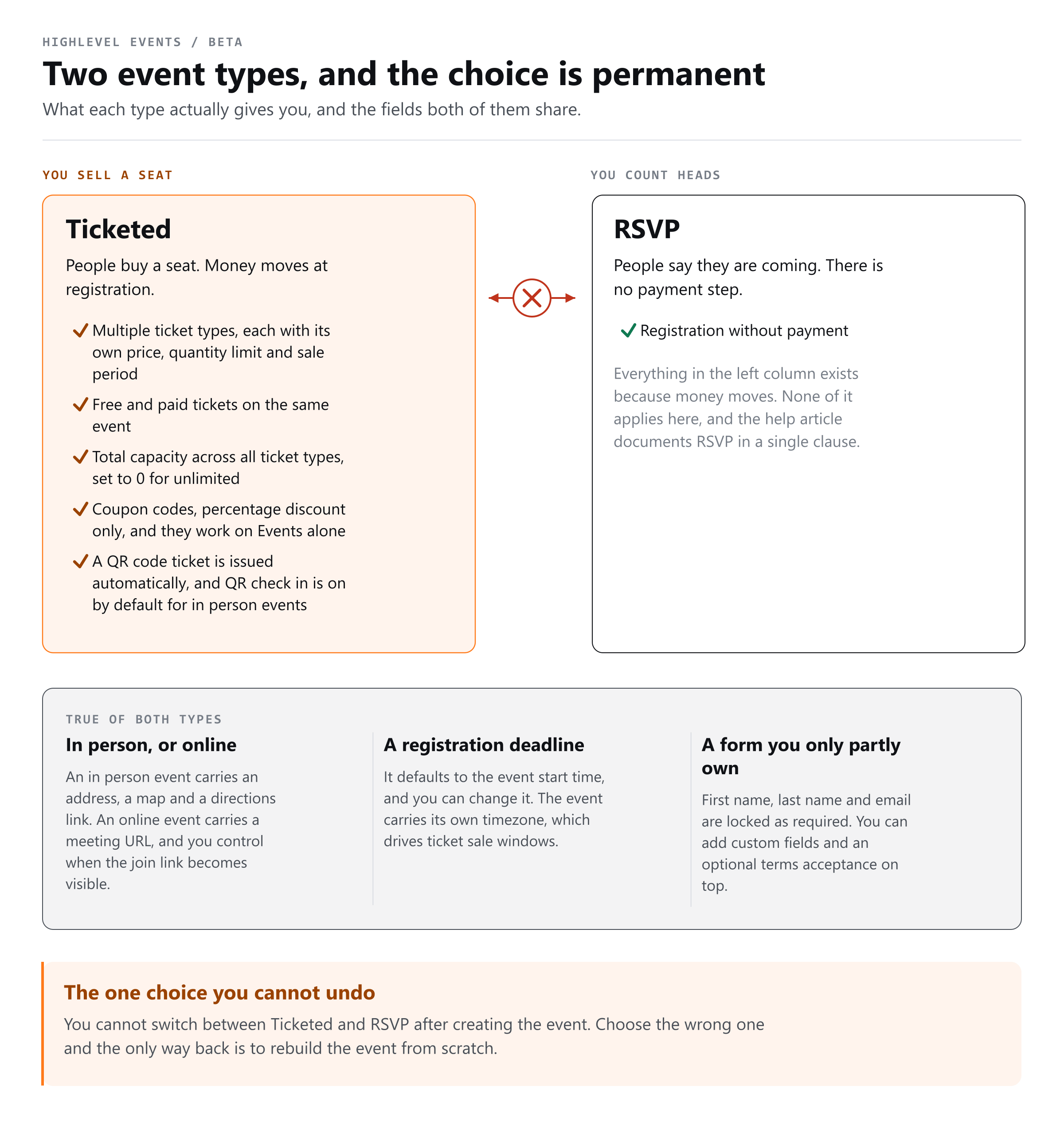
That last point is where GoHighLevel Events earns its keep. Whoever buys a ticket is a contact in the same CRM before the confirmation email lands, and the two moments that matter, registering and turning up, are both automation triggers.
Events, Event Calendars and Community Events are three different things
This is the easiest thing to get wrong, and several posts about the feature already have. The help article says it plainly: Events is not Event Calendars, which are for calendar-based bookings, and it is not Community Events, which run inside a HighLevel Community.
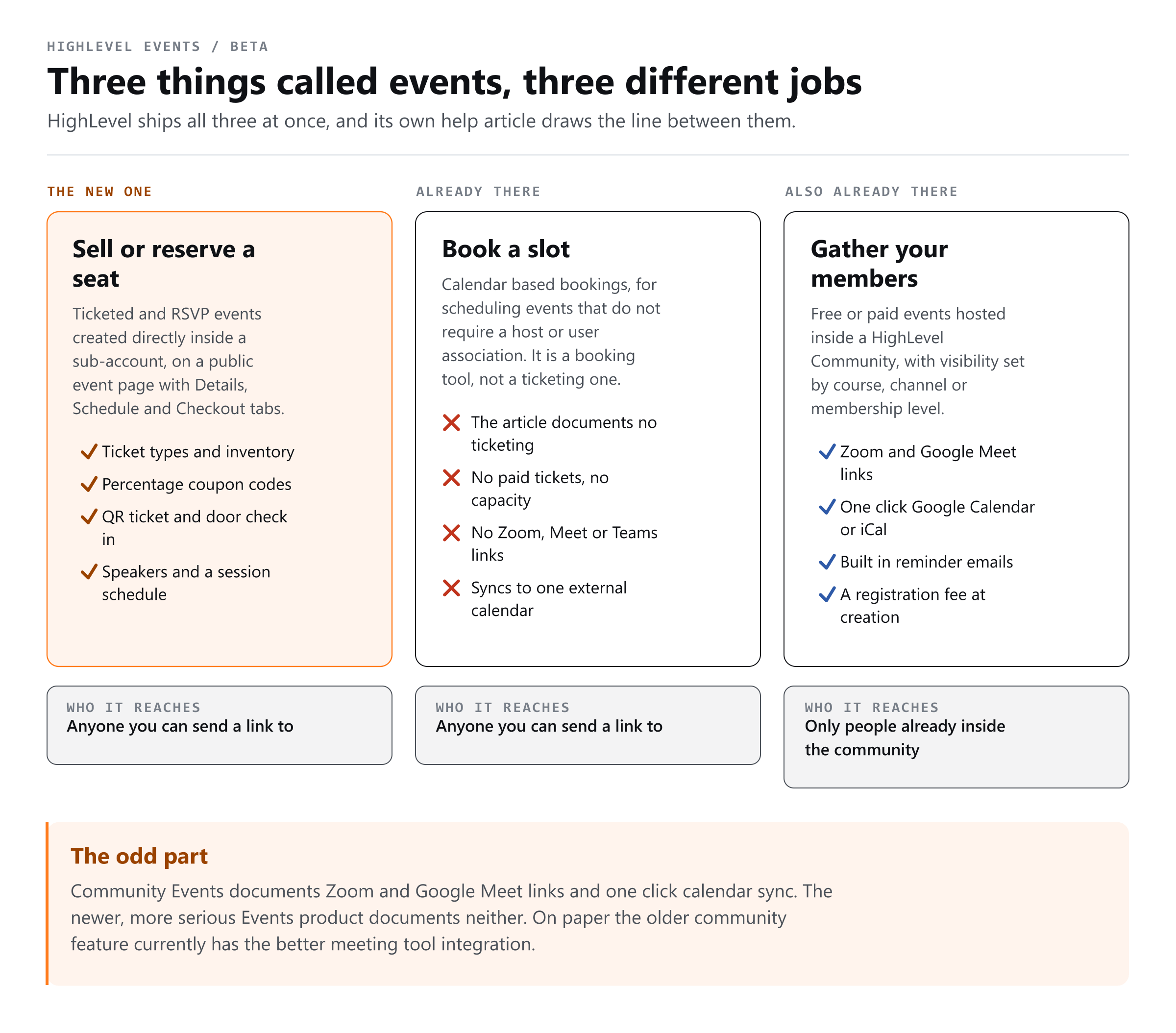
| Feature | What it is for | Ticketing | Meeting links and calendar sync |
|---|---|---|---|
| Events (beta) | Public ticketed or RSVP events with a full event page and door check-in | Ticket types, percentage coupons, QR tickets | Paste your own meeting URL. No Zoom or Meet generation documented. |
| Event Calendars | Bookable schedule for events that need no host assigned | Not documented | Documented as not supporting Zoom, Google Meet or Teams |
| Community Events | Events inside a Community, visible by course, channel or membership level | A registration fee can be set | Zoom and Google Meet links, one-click Google Calendar and iCal |
The irony is worth noticing. Community Events, the older and narrower feature, is the one documented for Zoom and Google Meet links and for adding an event to a calendar. The newer product is not. Anyone telling you Events generates a Zoom link has read about a different feature.
What Events cannot do yet
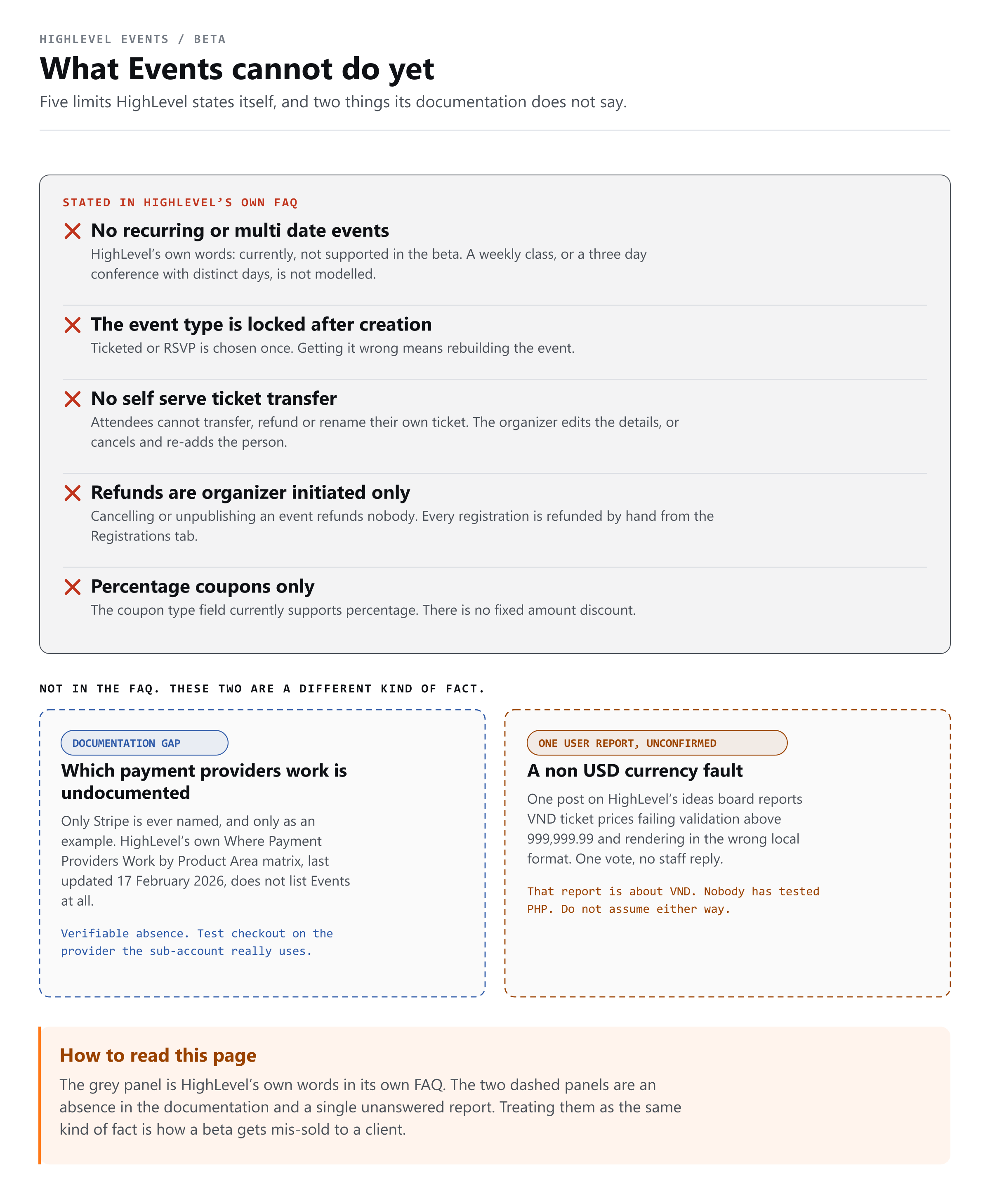
- No recurring or multi-date events. A weekly class or a three-day conference is not modelled. The FAQ says it is not supported in the beta, and promises nothing later.
- The event type is permanent. Choose wrongly and you rebuild the event.
- Refunds are manual. Cancelling or unpublishing refunds nobody; every registration is refunded by hand.
- No attendee self-service. No transfer, no self-refund, no name change.
- Percentage coupons only. There is no fixed-amount discount.
- Thin documentation. Waitlists, tax handling and whether the attendee list exports are not documented either way.
None of this is a reason to avoid it. It is a reason not to sell a client a three-day conference on it this month.
What this means for a Philippine agency
One thing is confirmed and it is good news: events carry their own timezone. Ticket sale windows use it, and the organiser daily summary email goes out at 09:00 in the event timezone rather than in whoever happens to be logged in. Running Manila events for a US client, or the reverse, is set per event.
Payments are the open question. The only provider HighLevel names for ticket revenue is Stripe, and it names it as an example rather than a list. Events is absent from the payment providers by product area matrix, which predates it. PHP pricing, GCash and Maya at checkout are not documented either way, which is not the same as unsupported. Test checkout on the provider your sub-account has connected before you promise a client ticket sales.
The revenue side is simpler. Ticket money moves through the connected provider on its own payout schedule, and HighLevel says it takes no cut beyond normal card processing. What lands is ordinary income, which is what the freelancer tax calculator and the free guides here are for.
Is GoHighLevel Events generally available?
No. It is in beta and distributed through Labs. HighLevel's changelog says the team is still in beta and asking for feedback, and no general-availability date has been published anywhere.
Where does Events appear in the sub-account menu?
Two official HighLevel sources disagree. The help article says Marketing, the changelog says Memberships. Look in both, and go by what your own sidebar shows.
Does it cost extra, or need a particular plan?
Nothing HighLevel has published states a plan requirement or a separate price. The one money statement is that ticket revenue carries no HighLevel fee beyond normal card processing. Treat plan availability as unconfirmed.
Can it create a Zoom or Google Meet link?
Not that is documented. You paste a meeting URL and control when it becomes visible. Zoom links, Google Meet links and add-to-calendar are documented for Community Events, which is a different feature.
Can I sell tickets in pesos through GCash or Maya?
There is no documentation either way. Stripe is the only provider named for Events, and Events is missing from the payment-provider matrix. Test it on your own connected provider before committing to a client.
The short version
GoHighLevel Events is the first time HighLevel has put ticket inventory, coupons, QR tickets and door check-in in one product instead of three borrowed features, and the buyer is a contact in your CRM the moment they register. That alone is worth a test event.
It is also a beta with manual refunds, no recurring dates, a permanent event type and two official documents that disagree about which menu it sits in. Build something small, then confirm the two things nobody has written down: which payment provider your checkout accepts, and what your own sidebar calls it. I build GoHighLevel automations for a living and will keep this page updated as the beta moves.