
Case study
Building a content and automation system that one person can run
For four months an operations engineer worked inside somebody else's marketing platform: a coaching and training business running its courses, memberships, live events, payments and community out of one GoHighLevel account. It produced four things. An internal operations app, a read-only audit toolchain that reads 102 workflows in a single pass, live automation on the production account, and a stack of client documents. Built by Kenneth Villar of BrewedOps, a Certified GHL Admin, working with Claude Code.
The last item on that list shipped as an architecture document with no code in it, recommending against building the software that had been asked for. That argument, and what broke on the way to it, is this page.
In short
- Four tracks over four months: an internal operations app, a read-only audit toolchain, live automation on a production account, and client documents.
- The audit tooling is read-only by construction. In the last full crawl every call was a GET except one token mint.
- Ticket data was put on contact fields, because a node inventory across 95 workflows found nothing in the account ever writes an opportunity field.
- Every discovery ran against a throwaway probe that was created, verified and deleted before any real asset was touched.
- The reusable onboarding template was built in a separate demo account, with the name verified before every write.
- The final deliverable was a blueprint with no code, argued on fragility rather than on cost.
- No business outcome is claimed here, because none was measured.
What was the problem this had to solve?
There was no single problem. Four tracks ran over four months, each from its own complaint: nobody could see inside an estate that grew from 63 workflows to 102, buyers of one product were logged in and locked out, information was handed over verbally instead of filed, and content production had no repeatable shape.
The subject runs its whole operation inside one marketing platform account: courses, memberships, a paid virtual event, payments and a customer community. Every entitlement is granted by automation rather than by the purchase itself, and there is exactly one system of record to break.
people pay for it but are logged in and greyed outreported by the operations team
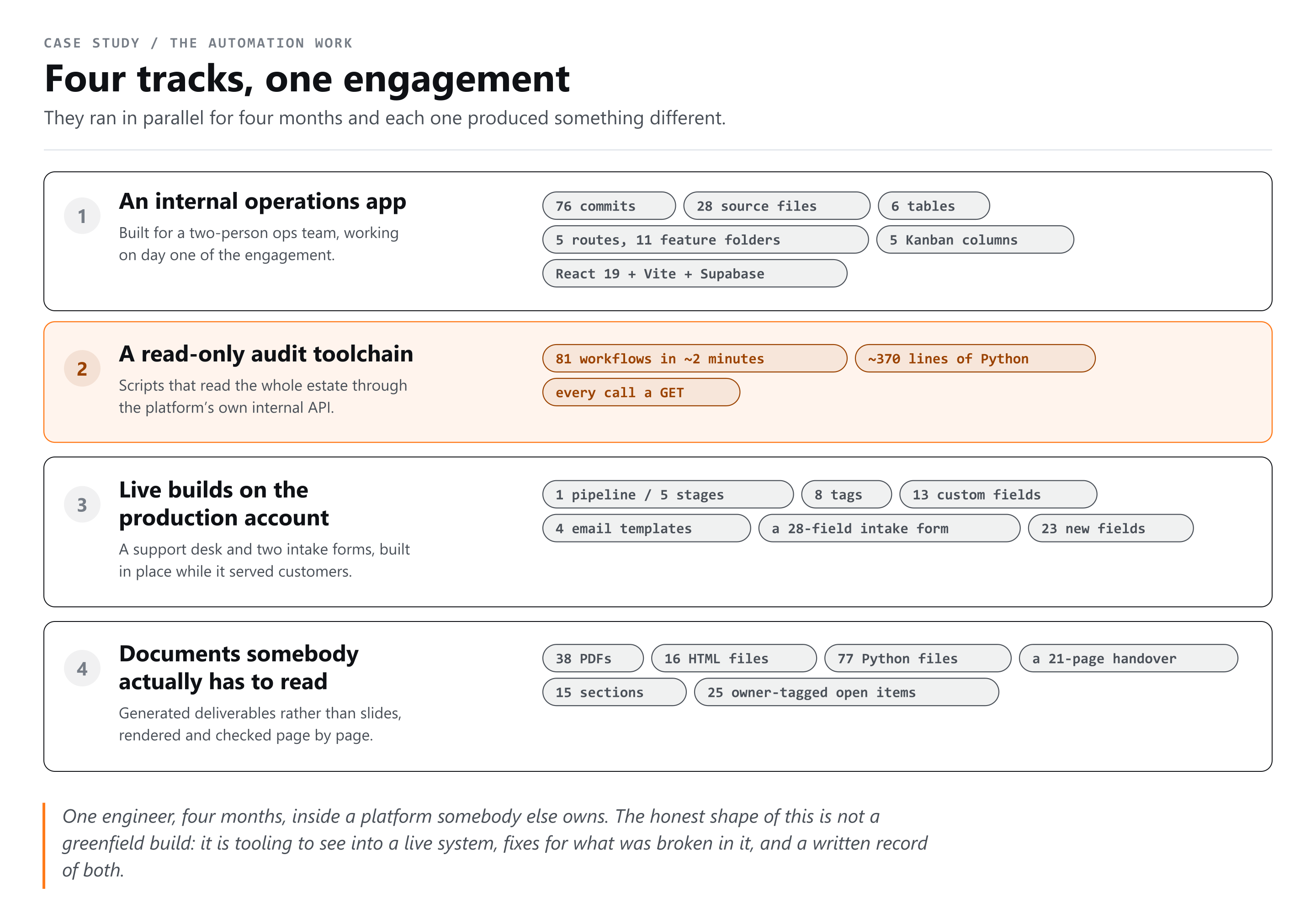
- The operations app. A two-person team had no shared place for tasks, decks, files or a launch board.
- The audit toolchain. Seeing the steps inside a workflow meant scrolling the builder, one workflow at a time.
- Live automation. Support requests, a webinar intake process, and the fields, tags and emails underneath them.
- Documents. Audits, checklists, procedures, a training library and a handover, generated rather than typed.
Why reverse-engineering an undocumented API was the cheap path
GoHighLevel publishes no API for the step structure inside a workflow, so the supported way to answer a structural question about 81 workflows was to open each one in the builder and scroll. A Python script of roughly 370 lines, talking to the platform's own internal endpoints, reads all 81 in about two minutes.
An hour of clicking answers one question on one day. Two days of reverse engineering answers every structural question for the rest of the engagement, and ports to any other account by swapping credentials.
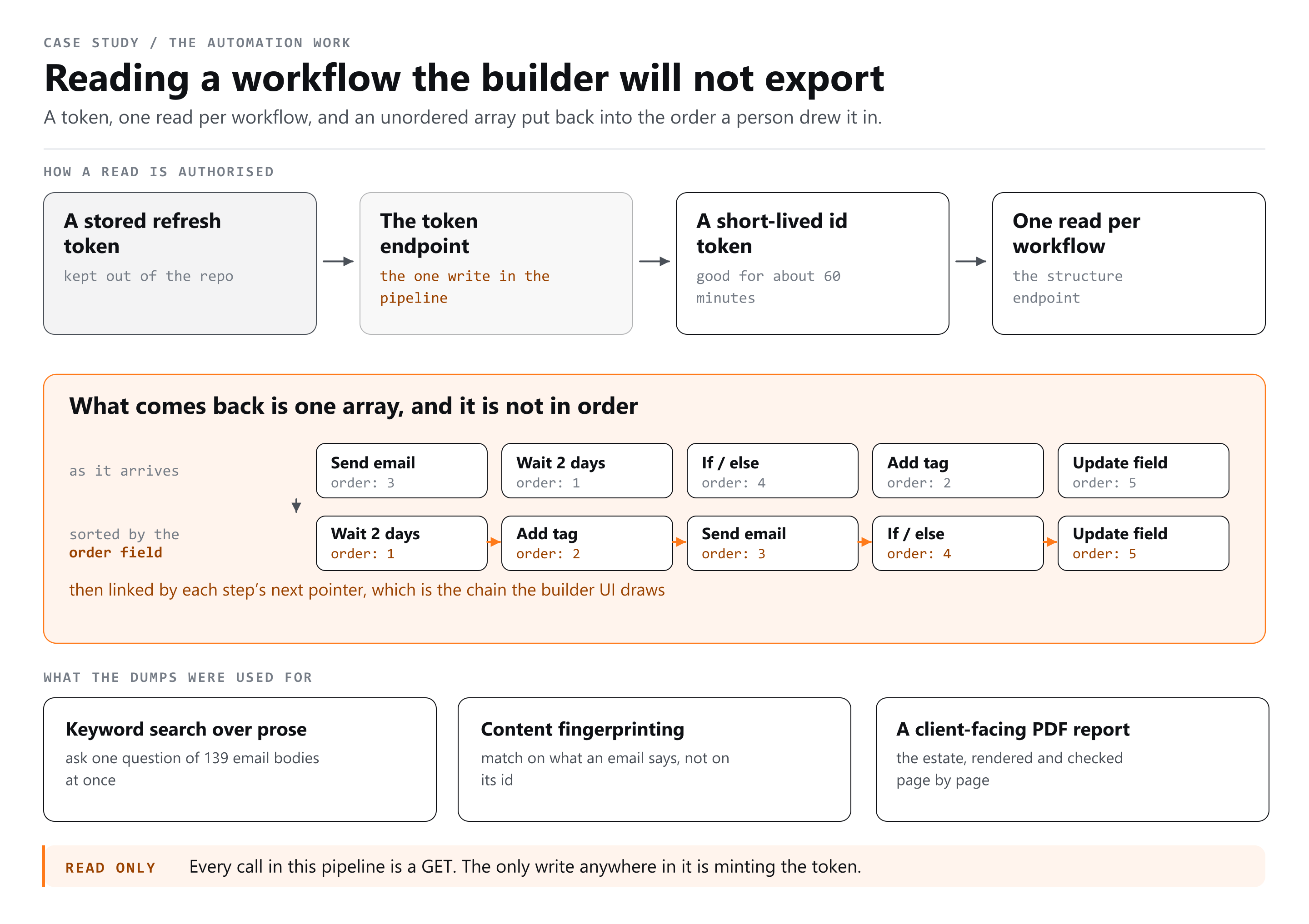
- A stored refresh token is exchanged for a short-lived id token. It expires after about an hour, which is why early runs died partway through until the refresh was built in.
- That token authorises a call for one workflow, and the step chain is already inline in the response.
- The chain is rebuilt locally by sorting on an order field and following a next pointer, then written to JSON. Every later question is answered from those files.
The problem
The step structure of a workflow had to be readable programmatically, and nothing documented returns it.
What was tried
About two hours in the wrong datastore. Fifteen or more collection paths against the platform's underlying document store all answered permission denied, and snapshot, version, history, schema and include-steps variants all answered 404 or 422.
What worked
Capturing roughly 3,000 real requests from a live browser session and reading what the builder itself calls. The working route is singular with the location in the path, where every guess had used the plural form with a query parameter. No document store was involved at all.
GET /workflow/{locationId}/{workflowId}      -> 200, steps inline
GET /workflows/{workflowId}?locationId=... -> 404, every variantThe stack, and why each piece is there
The internal operations app is React 19, Vite, TypeScript, Tailwind CSS v4 and React Router over Supabase, deployed to Vercel, at 76 commits and 28 source files. The audit and automation layer is Python and Node.js scripts against GoHighLevel, with Playwright for the things only a real browser can confirm.
| Layer | Choice | Why it is there |
|---|---|---|
| App shell | React 19, Vite, TypeScript, Tailwind CSS v4, React Router | Five routes over six tables on day one, editable by one person for months after. |
| Data and auth | Supabase, PostgreSQL underneath | Tasks belong to projects belong to assignees. That is relational and it needed joins. |
| Audit trail | Insert-only activity logs, each change a from and to pair | No delete policy exists on that table, so the history cannot be edited by the app that writes it. |
| Hosting | Vercel | An internal tool with single-page rewrites and no server of its own. |
| Audit and automation | Python and Node.js against the internal GoHighLevel API | Python for the report generators, Node for the crawlers, both reading the same local JSON. |
| Verification | Playwright | Some answers exist only in a real browser on a real origin. |
The automation layer is the platform itself rather than a service bolted beside it. A form starts a workflow, the workflow writes contact fields, a router assigns an owner, an opportunity lands on a dedicated pipeline, and each of five stages carries its own sequence. One non-obvious detail: a stage-change trigger must be filtered by pipeline, or it fires on every pipeline in the account.
Named, considered and rejected
- Firebase for the app data, because the task, project and assignee relationships needed joins.
- Airtable as the content database, on its free-plan record and automation caps and, more decisively, because it is a new tool for the team to learn.
- n8n and Zapier for the first phase, because nothing in the design needed a service the business was not already paying for.
- A transcription vendor's API, because it was early access and credit metered, and an early-access API breaks quietly.
- A custom API build for the content system, rejected outright. That argument has its own section below.
How the work was actually split between a person and the AI
Claude Code wrote almost all of the script code, the report generators and the app features. What it could not do was decide where to look, and the most expensive mistake of the engagement was two hours of confident, well-formed searching in the wrong place that a person had to stop.
- Written by the AI: the crawlers, the report generators, the app features, the find-and-replace maps, and every document template.
- Specified by a person: what question was being asked, which account was safe to ask it in, what counts as evidence, and when to stop.
- Verified by a person: every write, by re-reading state rather than the response code. Every visual claim, by screenshot.
Turning a bespoke account into a reusable onboarding template meant genericising 52 email bodies and 14 workflows. Eight parallel agents each built a find-and-replace map for a slice of the emails, and the maps were applied centrally in one pass. Fanning out the reading is safe. Fanning out the writing is how two agents overwrite each other.
The durable artifact is not any one script. It is the written instruction file in the project, corrected every time something surprises us, whose most useful line reads: trust the user's screenshot over my synthetic test results.
What went wrong
None of the four failures worth recording were syntax errors. An identifier match that should have found a workflow returned zero hits across all 81, a write returned 200 with an id and silently did nothing, a scroll-reveal effect hid 54 blocks of a finished client document permanently, and a hand-rolled validator reported a bug that did not exist.
The problem
An email had been reported as wrong, and the question was which workflow sends it.
What was tried
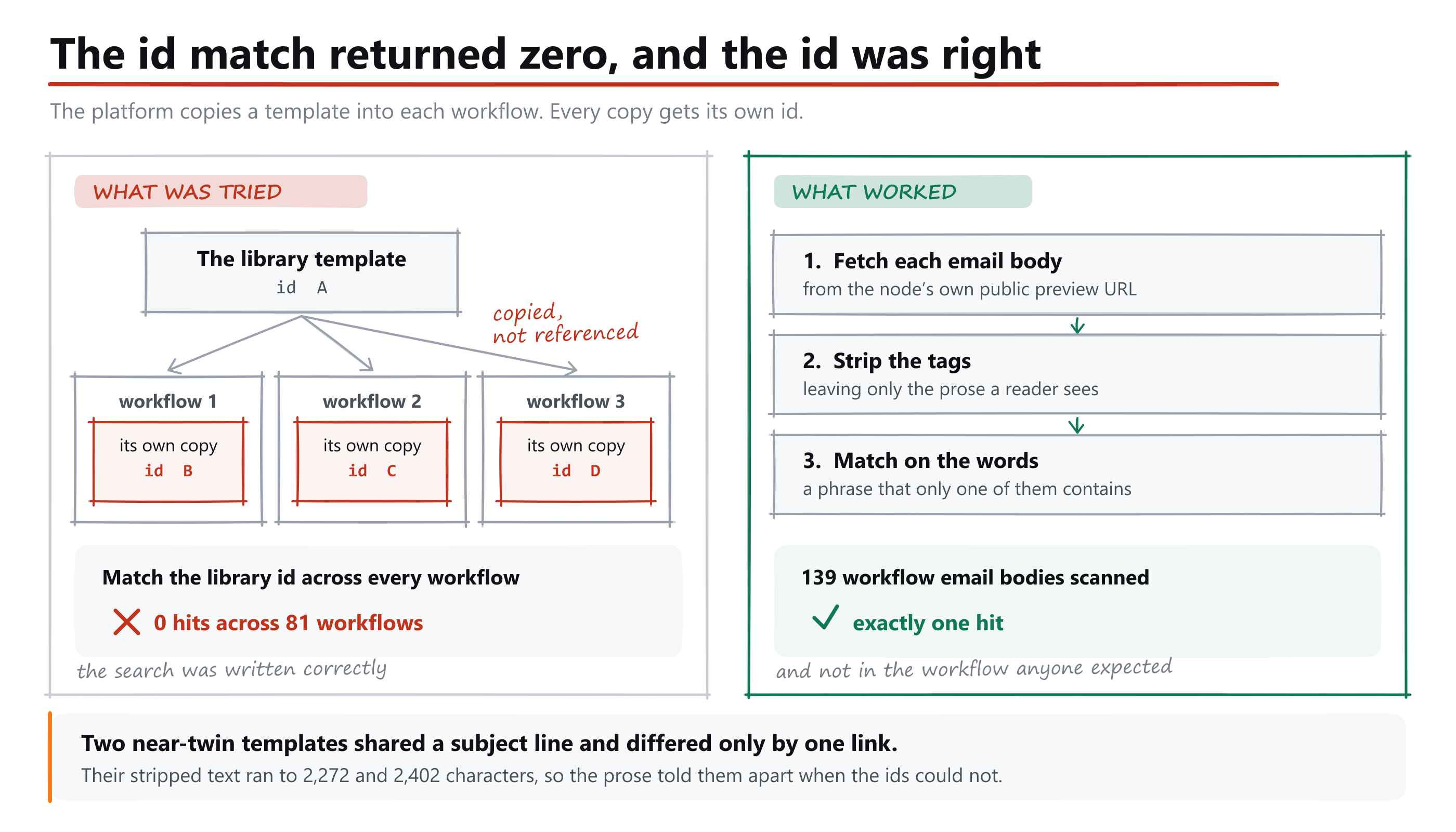
Matching the library template identifier across all 81 workflows. Zero hits, which reads exactly like a broken script.
What worked
A workflow email action stores a private copy of the library template with its own identifier, so matching by id or name is structurally useless. Content fingerprinting replaced it: fetch each node's public preview, strip the tags, match on prose. Two near-twin templates shared a subject line and differed by one link, at 2,272 and 2,402 characters. Scanning 139 workflow email bodies found exactly one hit.
The problem
Attaching a trigger to a workflow appeared to succeed and changed nothing.
What was tried
Roughly eight permutations of the same call. A snake-case body looked like success. A body missing the parent reference looked like success.
What worked
It links only when the workflow reference in camel case, the parent reference and the event type ride together alongside the query parameter. The durable fix is not that body shape, which will change. It is the rule: verify a write by re-reading the count, never by trusting a 200 with an id.
The problem
A finished client document had 54 blocks present in the HTML and invisible in the browser.
What was tried
Reading the markup, which was correct, and the console, which was clean.
What worked
A scroll-reveal effect set every block to zero opacity and restored it with an intersection observer, so anything the observer missed stayed invisible forever. Content must never depend on a script succeeding.
- PostgreSQL has no create-policy-if-not-exists form, so a migration that reads fine fails on rerun.
- An upload reported success and displayed nothing, because an automatic join returned empty when the foreign key pointed at the auth table rather than the profiles table.
- Serialising an object to run a string replace escapes the literal quotes inside quoted copy, so plain find strings quietly stop matching.
- An ampersand is stored as an HTML entity where a trademark symbol and curly quotes are stored literally, so a find string built from what is on screen misses.
- A validator written inline in a shell string reported 14 open tags against 212 closing ones, because an escape sequence collapsed inside double quotes.
- A client document went out dated three days early, because the date came from a token claim printed by the script rather than the system clock.
How a paying customer can be logged in and locked out
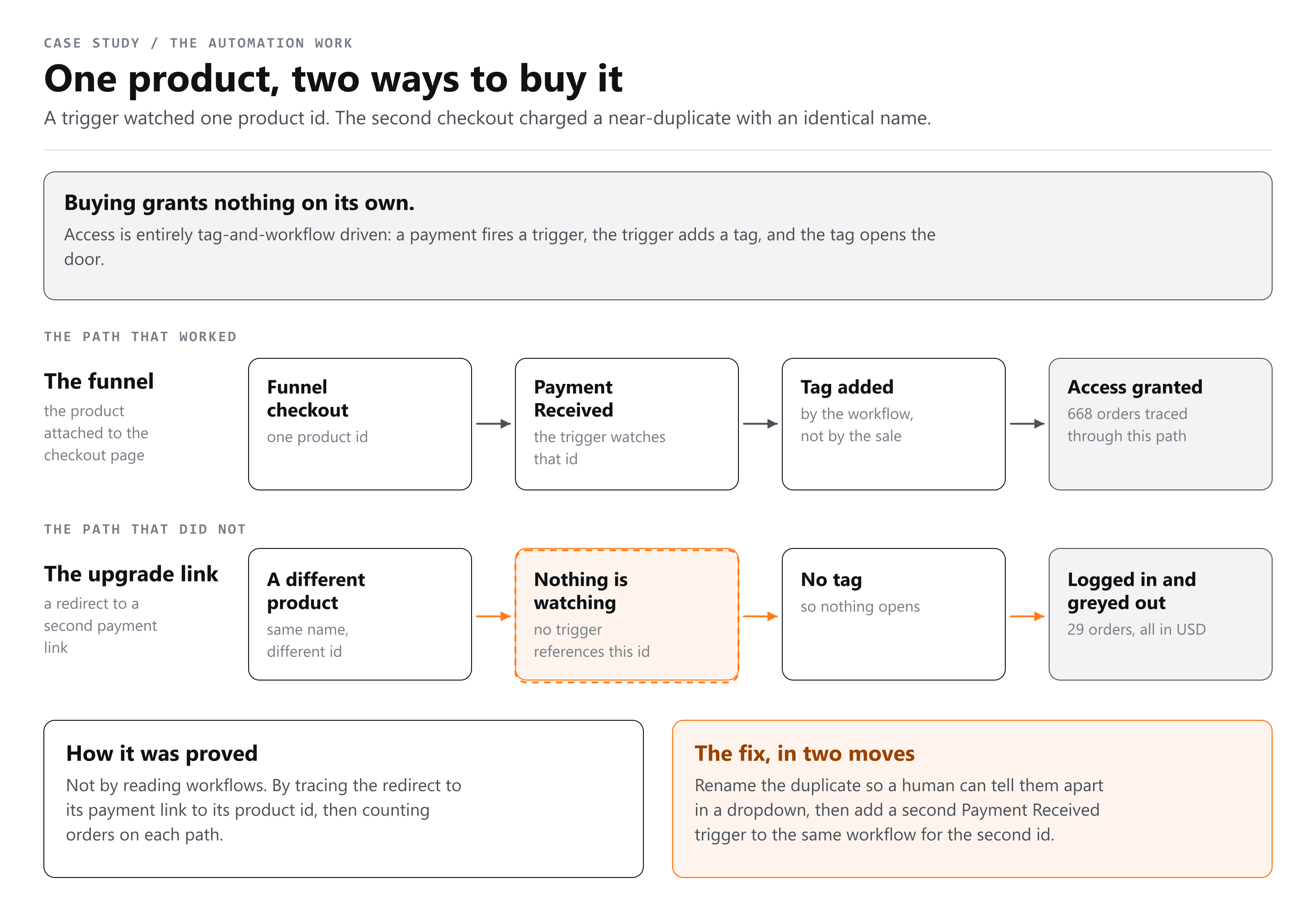
Buying granted nothing on its own. Access was tag and workflow driven, the granting workflow watched one product identifier, and the same product also sold through a second path charging a near-duplicate product with an identical name and nothing watching it. Order data settled it: 668 orders through the first path granted access and 29 through the second did not.
The problem
Members who had paid could sign in and see nothing. No error, no failed payment, no obvious pattern.
What was tried
Reading the entitlement from the platform. The product-access check and the granted-offers endpoint both ignore the contact you ask about and return empty, and the member-list endpoints answer 403 or 404.
What worked
Order-level evidence, which no API can misreport. Tracing an upgrade redirect to its payment link to its product identifier proved two near-identically-named products existed and only one was watched, and all 89 workflows were scanned to confirm nothing else referenced either. The fix: rename the duplicate, then add a second payment trigger for it.
The part worth copying is the correction inside it. The first pass reported nineteen members stuck, having checked one granting tag. Re-checking every granting tag showed twenty-four of twenty-five already carried one, and exactly one was genuinely without a grant.
The audit finding that was nearly a deletion
A ring-fence audit flagged 8 items sitting in the wrong account, 7 tags and 1 custom value, and the first draft of the plan had them deleted that week. They were live production assets belonging to 6 paying subscribers of a second product that was mid-migration, and deleting them would have broken those customers.
The audit was right about the facts and wrong about the frame. It labelled the assets contamination, which is the correct word if the job is a fresh build. The job was a migration, and no tooling could have caught that, because nothing in the data says whether one has finished.
- The cleanup moved behind a hard gate, so it can only run once a parallel run has proved the new account works.
- A migration phase with its own eight tasks was added, because what had been missing was a phase rather than a checkbox.
- A do-not-touch rule was pinned in bold at the top of the launch board's blockers panel, where the person doing the work would see it, not filed in a document nobody opens mid-task.
How does the system decide what to publish, and what to hold?
Nothing reaches an audience without passing two gates. Every idea is routed through a written brief that a person approves before anything is produced, and every finished draft is checked against a rules list taken from the business's own written standards, with the judgement calls escalated to a person rather than decided by the machine.
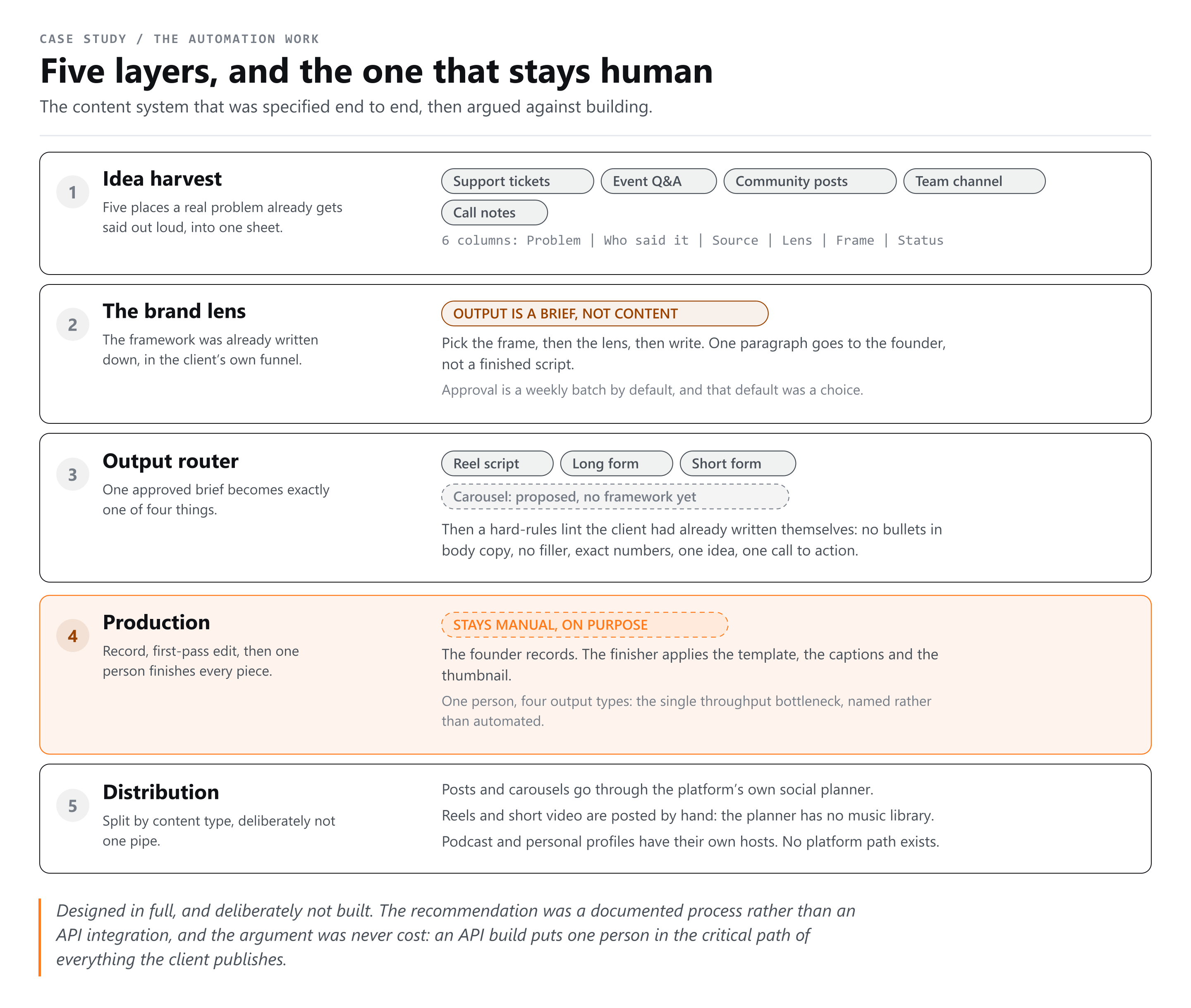
- Harvest. Problems from support requests, event questions, community posts and call notes land in one sheet of six columns, including who said it. There is no second database.
- Lens. An assistant project holds the written framework as its knowledge and turns one problem into a brief. The order is load-bearing: frame first, then lens, then write.
- The output is a brief, not content. One paragraph naming the problem, the frame, the angle and the bucket. That is what a person approves.
- Route. One approved brief becomes exactly one of four formats. The fourth was flagged as a gap in the source framework rather than invented.
- Check. Every draft is measured against a hard-rules list before a person reads it.
The approval gate is deliberately a setting rather than a policy: weekly batch, approve nothing, or approve everything are all legitimate, and it defaults to the weekly batch. A gate whose strictness cannot be changed gets routed around within a month.
The rules list was not written for this project. It was already in the business's own material as a page of hard rules about how copy may be written, most of it mechanically checkable, and it even named a tell that gives away machine-written copy. Enforcing an existing standard beats authoring a new one and asking somebody to adopt it.
What stays manual on purpose, and why
Three things stay manual by design: posting short vertical video, the finishing edit, and approving every brief. Short-form goes out by hand because the platform's own social planner carries no music library, and trending audio is a primary reach driver on short video, so routing reels through it would trade reach for tidiness.
That is a platform limit rather than a preference, and it forced distribution to split rather than run as one pipe. Long-form posts, carousels and short text go out through the scheduler. Reels are posted natively. A podcast has no path through the platform, and personal profiles have none either, because the underlying social API only supports pages.
- The finishing edit. One person, four output types, more than half a dozen accounts. That is the throughput bottleneck of the whole system, and the design names it instead of hiding it behind an arrow.
- Approving the brief. The cheapest place to reject a piece of content is before anybody records it.
- Folder renames, funnel page copies and a few template fields. No endpoint exists for any of them, so they were handed back as an explicit manual list rather than half-automated into something unreliable.
One chore nobody plans for is written into the plan: social connection tokens expire and drop quietly, and a scheduler with a dead connection looks like one with nothing queued.
Why the final deliverable argued against building software
The content production system shipped as an architecture document with no code in it, recommending against building the software that had been asked for. The argument was never about money, because at that volume the API calls would have cost close to nothing. What a custom build adds is one person in the critical path of every piece of content the business makes.
Cost is not the reason to avoid the API. Fragility is. An API build puts me in the critical path of every piece of content they make.from the architecture document
Two findings made that obvious rather than brave. The first was the brief, whose stated constraints were not about capability at all, and one of which arrived three separate times.
Keep costs low, if we do not have to use anything new let us stick with what we have. Keep it as simple and fool proof as possible. I am looking for simplicity.the brief, condensed from three messages
A custom build satisfies none of that. It adds a service to maintain, credentials to rotate, an error path nobody on the team can read, and a dependency on one contractor who will not always be there. A shared sheet, an assistant project with the framework loaded into it, and a rules check the writer runs on their own draft satisfy all of it, and every piece is already paid for and already understood.
The second finding flipped the premise of the whole track. The plan had been to extract the content framework out of the founder's head over a month of interviews. A read-only crawl found it already written down in full, as downloadable PDFs inside their own funnel pages, in two generations of 13 and 17 pages, and nobody had mentioned either existed. That turned a month of authoring into about a week of wiring, and it is the strongest argument here for auditing what a client already has before quoting to build them anything.
No code is not the same as no system. The design still has one database of ideas, a defined order of operations, a brief format, an approval gate, an automated rules check and a split distribution layer. What it does not have is anything that can break at two in the morning in a way only its author can fix. The 30 to 42 hour estimate attached to it is for wiring and writing, not engineering.
What four months actually produced
Four tracks of verifiable output: an operations app at 76 commits and 28 source files, a read-only toolchain that reads 102 workflows in one pass, live automation on the production account, and 38 client PDFs and 16 standalone HTML deliverables generated from 77 Python scripts.
- The app. 76 commits, 28 source files, 6 tables and 5 routes at launch, 11 feature areas at the end, on Supabase and Vercel.
- The tooling. 81 workflows read in about two minutes by roughly 370 lines of Python, growing to a crawl of 102 workflows and 139 workflow email bodies.
- The automation. A support pipeline of 5 stages, 8 tags, 13 custom fields and 4 drag-and-drop email templates, plus a 28-field intake form carrying 23 new custom fields.
- The template. 52 email bodies and 14 workflows rewritten to placeholders in a demo account, using 8 parallel agents to build the maps.
- The documents. 38 PDFs and 16 HTML deliverables, a training library of 32 video cards across 9 sections that took 16 rounds of curation, and a handover of 21 pages and 25 owner-tagged open items.
What I would do differently
Three things, and all of them are about the order the questions get asked in rather than about code: check whether the process being automated is already written down before extracting it from anybody, settle fresh build against migration before writing a plan, and stop a search that has been wrong for an hour instead of trying the sixteenth path.
- Audit what the client already has, first. A month of planned interviewing turned out to be about a week of wiring. That check costs an afternoon and should be the first afternoon.
- Time-box a failing search. When several plausible paths have failed the same way, the assumption underneath them is the thing to test.
- Wait for the walkthrough before writing somebody else's process down. A procedure written from source material was structurally wrong until an hour with the person who runs it, including two figures introduced during a reformat that had never existed.
- Verify a write by re-reading the state, not by reading a response code that was 200 with an identifier on every call that silently did nothing.
Almost none of the hard problems were coding problems. They were questions about which system holds the truth, which account is safe to ask in, and whether the thing being requested is the thing that should be built. Working with Claude Code moves the cost of an engagement from typing to deciding, and the most valuable deliverable here contains no code at all.
Questions people ask
How long did the whole engagement take?
- Four months, from mid-April to mid-August 2026, with four tracks running in parallel rather than in sequence. The internal operations app was started on day one and reached 76 commits. The audit toolchain, the automation and the documents were built alongside it as each problem surfaced, and it closed with a handover of 21 pages and 25 owner-tagged open items.
How much does something like this cost?
- There is no single figure, because the four tracks price differently. A read-only audit of an existing account is bounded work with a fixed scope. Live automation on a production account is priced by what is being built and how much of it has to be verified by hand. Current rates are published on the pricing page rather than quoted here.
Can I do this myself without knowing how to code?
- Parts of it, yes. The automation, forms, pipeline and email templates were built through the platform interface by somebody who knows that platform well, which is a learnable skill rather than a programming one. The audit toolchain is not in that category. It meant reading an undocumented internal API out of captured browser traffic.
Is it safe to run scripts against a live CRM?
- It is safe when the tooling cannot write, and unsafe otherwise. In the last full crawl of this account every call was a GET except one token mint, so the worst failure available was reading something twice. Anything that did write ran first against a throwaway probe that was created, verified and deleted, and the bulk rewrites happened in a separate demo account.
What happens when the AI writes something wrong?
- Usually it looks like success, which is the real danger. A trigger call returned 200 with an identifier and attached nothing. An upload reported success and displayed nothing. A scroll-reveal effect hid 54 blocks of a finished document while the markup stayed valid. The defence is verification by re-reading state and by screenshot, because all three passed the checks being run.