
Context Engineering
Choosing what the AI gets to see while it answers
Prompt engineering is writing your question well. Context engineering is everything else in front of the AI at that moment: your files, your notes, the chat so far, whatever a tool just returned. It is the bigger lever, and almost nobody thinks about it.
The thing nobody tells you
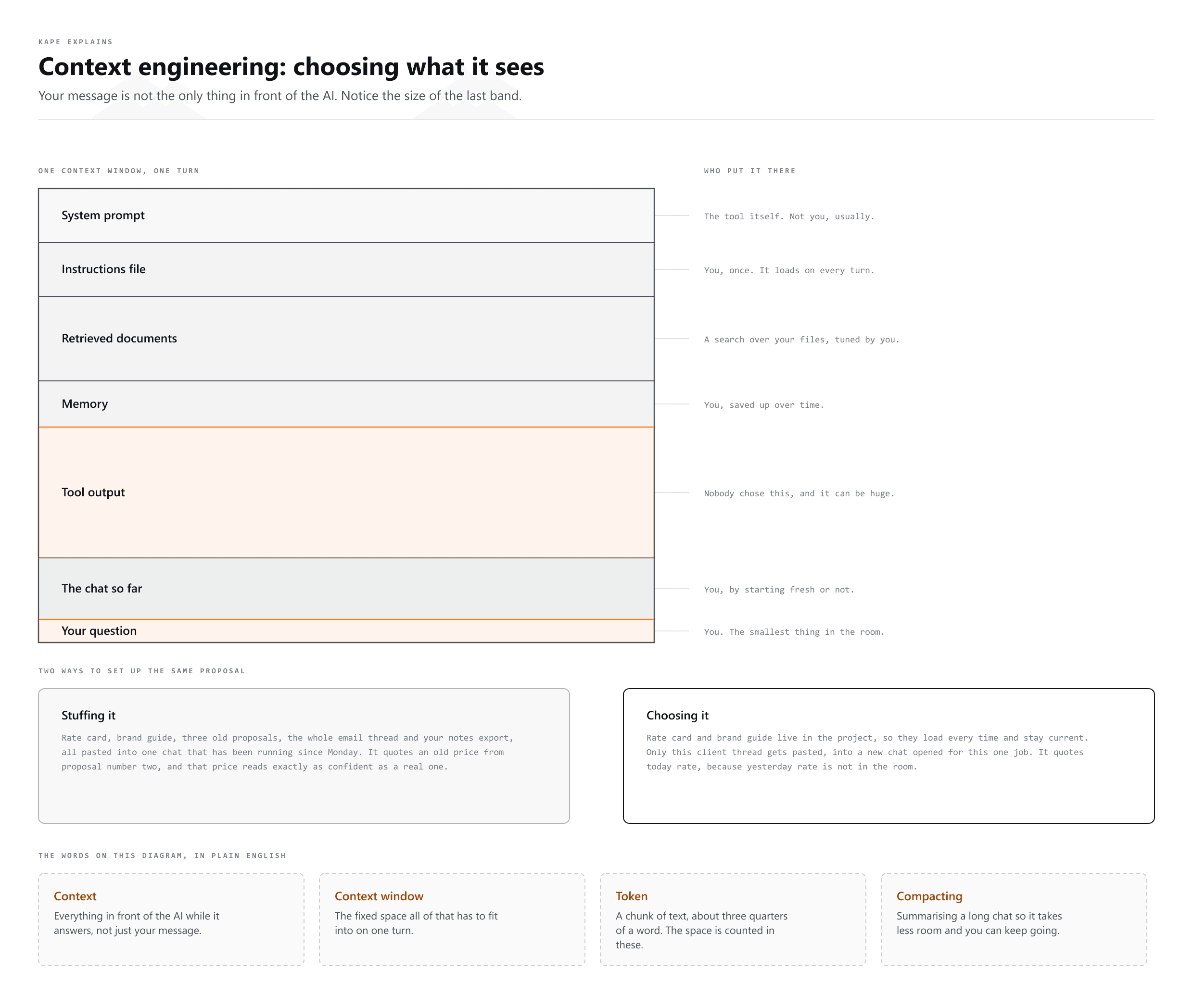
When you send a message, the AI does not only see your message. It sees a whole pile of other material you probably never chose on purpose: the standing instructions, your project files, the entire chat up to now, and whatever any tool just handed back.
All of that has to fit in one fixed space, called the context window. Context engineering is just deciding what goes in it.
Why more is not better
This is the part that surprises people. Adding more context does not keep making answers better. Past a point it makes them worse.
- The important thing gets buried. One key sentence competes with two hundred pages of things that do not matter.
- Old and new fight each other. A file from last year and a file from last week both look equally true to the AI.
- Abandoned turns still count. The idea you told it to drop is still sitting there being read on every message.
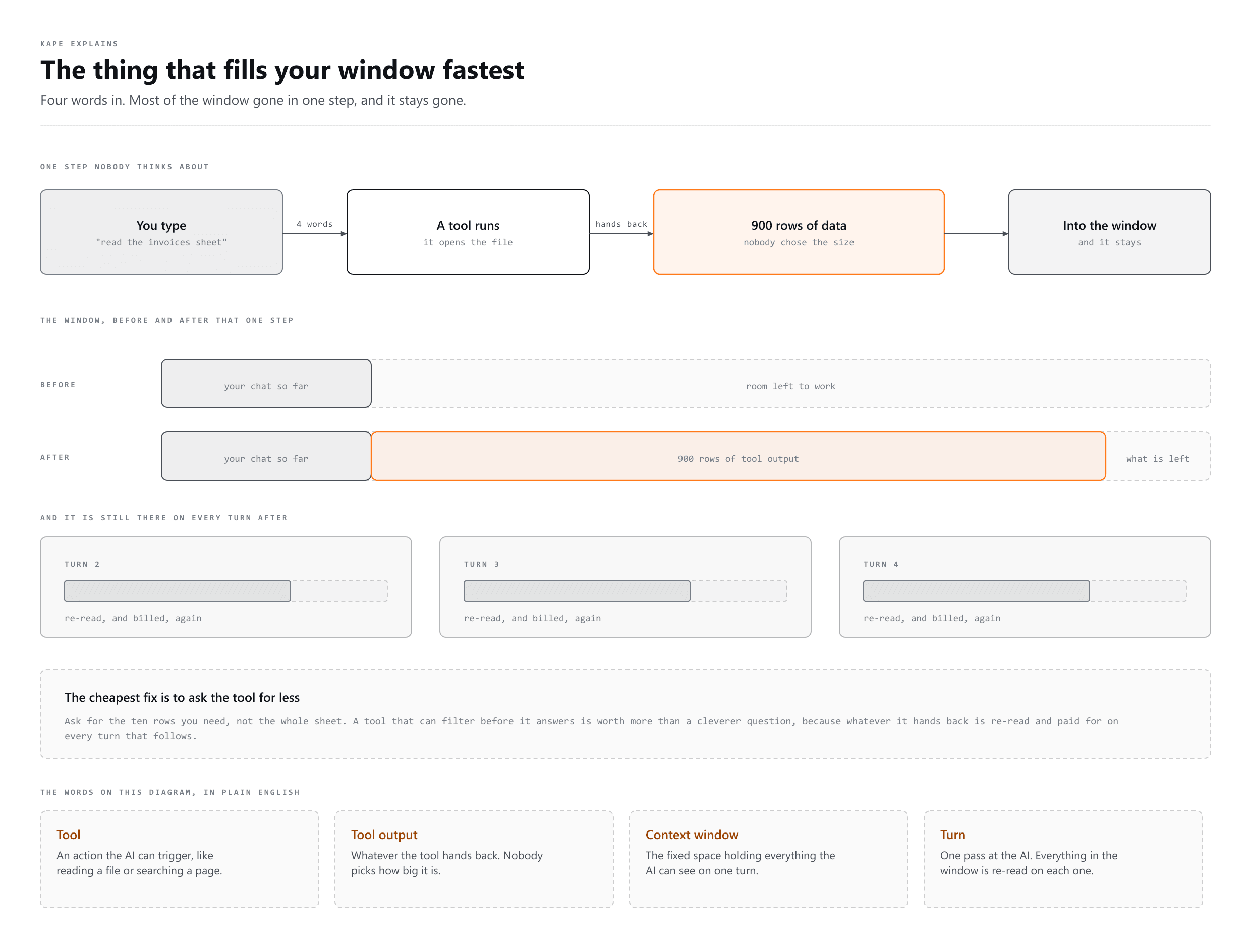
- It costs more every single turn. The whole pile is re-read each time you send anything.
The smart zone and the dumb zone
Here is the part that catches almost everyone. The window has a size and you can watch it fill. Quality does not wait for it to be full: it starts slipping well before that, and nothing on your screen says when.
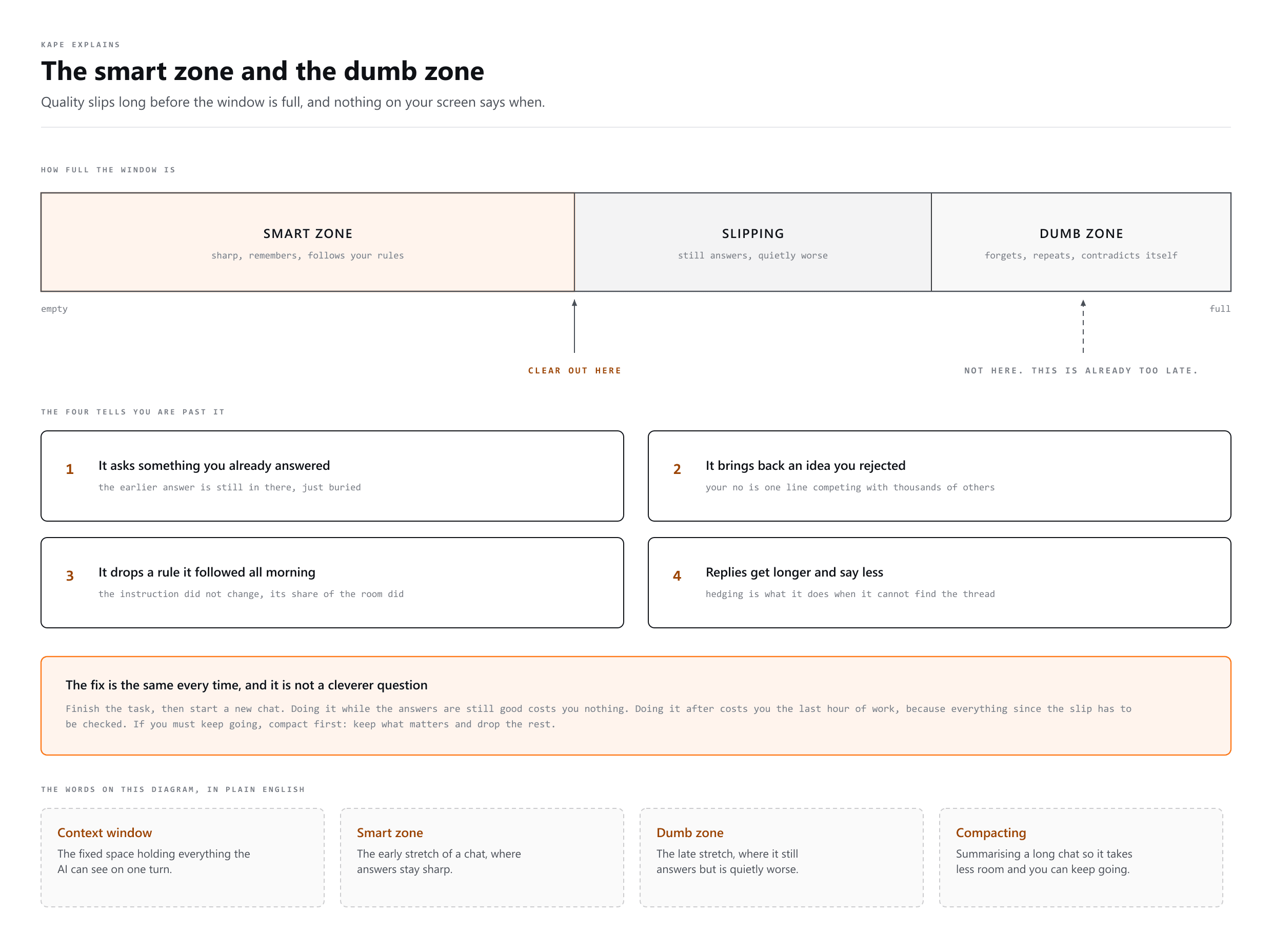
Three stretches. Early on it is sharp: it remembers, follows your rules, stays on the thing you asked for. Past the middle it slips, still sounding exactly the same. Near the end it forgets, repeats itself and contradicts what it told you an hour ago.
Where the good stretch ends differs by model and moves with every release, so a number here would be stale before you read it. You do not need the number. You need the four tells.
- It asks you something you already answered. The earlier answer is still in there. It is just buried.
- It brings back an idea you rejected. Your "no" is one line competing with thousands of others.
- It drops a rule it followed all morning. The instruction did not change. Its share of the room did.
- Replies get longer and say less. Hedging is what it does when it cannot find the thread any more.
The three moves
- Put in. Give it the real material, not your summary of it. The actual thread, the actual file, the actual error.
- Leave out. Do not attach the whole handbook to ask one question. Ask for the pages you need.
- Clear out. One task, one chat. When the task is done, start a new one. Use
/compactif you must keep going.
Where the context actually comes from
| What | Where it comes from | Who decides |
|---|---|---|
| System prompt | The tool itself | Not you, usually |
| Instructions file | Your CLAUDE.md or project instructions | You, once |
| Retrieved documents | A search over your files | The search, tuned by you |
| Memory | Saved facts from before | You, over time |
| Tool output | Whatever a tool just returned | Nobody, and it can be huge |
| Chat so far | This conversation | You, by starting fresh or not |
Look at the fifth row. Tool output is the one that catches people out: one command returning a wall of text can eat half your window in a single step, and nobody chose that.
A freelancer example
You want a proposal. Two ways to set it up:
Stuffing it
  Paste the rate card, the brand guide, three old proposals,
  the client's whole email thread, and your notes app export.
  Then ask for the proposal.
  -> It quotes an old price from proposal number two.

Choosing it
  Rate card and brand guide live in the project, so they load
  every time and stay current.
  Paste only THIS client's thread.
  Start a new chat for this proposal.
  -> It quotes today's price, because yesterday's is not in the room.
How this relates to the other words
- Prompt engineering is writing the question well.
- Context engineering is choosing what else is in front of the AI while it answers.
- RAG is one way of doing context engineering: search first, put only the hits in.
- The harness is the whole machine that assembles the context for you on every turn.
People often talk about these as three fashions that replaced each other. They did not. Each one is a bigger box around the one before it.
Common mistakes
- One chat for everything, all week. The single most common one, and the easiest to fix.
- A giant instructions file. It loads on every turn, so every extra page is a tax on every message.
- Attaching a document to ask about one page of it.
- Never removing an old file from project knowledge, so last year's prices stay just as available as this year's.
- Assuming it remembers. If it is not in the window and not saved somewhere, it is gone.
More words
- Prompt Engineering
Writing the instruction so the answer comes back right
- Loop Engineering
Teaching an AI to check on its own, no prompt needed
- Graph Engineering
How many AI agents connect and work as a team.