
Loop Engineering
Teaching an AI to check on its own, no prompt needed
Loop engineering means setting up an AI so it checks on something by itself, again and again, on its own schedule, instead of waiting for a person to ask each time. It builds on top of simpler ideas like writing a clear instruction or giving the AI a plan for a big job. For a freelancer or VA, it matters because it shows where AI tools are heading: less 'please do this now' and more 'keep watching this for me.'
What loop engineering means
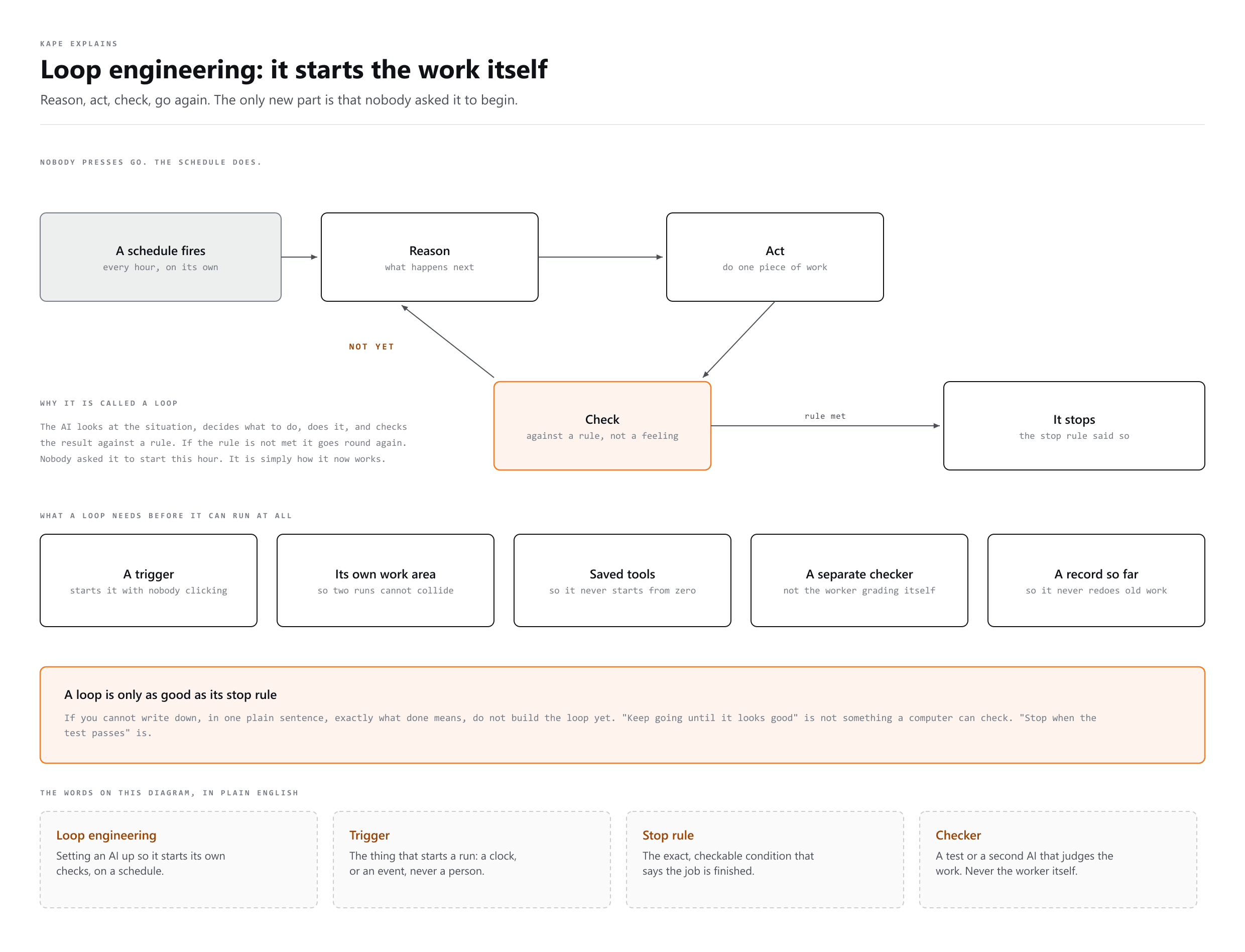
Loop engineering means setting up an AI so it checks on something by itself, over and over, on its own schedule. Instead of a person asking the AI to do a task each time, the AI starts the task on its own. The AI looks at a situation, decides what to do, does it, checks the result against a rule, and repeats. It only stops when that rule says the job is finished. This repeating pattern is why it is called a loop.
The problem it solves
To see why loop engineering came up, it helps to look at the ideas that came before it. Each one was invented because the one before it hit a limit.
- Prompt engineering is writing a clear instruction. It works well for questions the AI can already answer using what it knows, like a simple math question.
- Context engineering lets the AI go get extra facts on its own, such as searching the internet, before it answers a harder question. This works well, but it struggles once a job takes longer than a few minutes.
- Harness engineering was built for long jobs. A long job needs more information than the AI can hold at once. If the AI keeps shortening its own notes to make room, important details start to disappear. Harness engineering is an outside system that tracks the whole job and breaks it into smaller steps, so the AI can work through a long list of tasks without losing the plot.
Loop engineering stacks one more layer on top of harness engineering. It does not remove the need for a clear instruction, useful facts, or a solid plan. What it changes is who starts the work. In every stage before this one, a person had to ask the AI to begin. In loop engineering, the AI begins on its own, based on a schedule or a rule that was set up in advance.
How the loop actually runs
- Reason. The AI looks at the situation and decides what needs to happen next.
- Act. The AI does one piece of work, like updating a number or trying a fix.
- Check. The AI compares the result against a clear, checkable rule, not a feeling.
- Repeat or stop. If the rule is not met yet, the AI goes back to reasoning. If the rule is met, the loop stops.
What a loop needs to actually work
- A schedule or trigger. Something that starts the check on its own, like 'every hour', with no person clicking a button.
- A safe, separate work area. So that two checks or fixes running at the same time do not bump into each other or overwrite each other's work.
- Saved knowledge and tools. Things the AI already knows how to use, so it does not have to start from zero every single time it runs.
- A checker. A second AI, or a test, that reviews the first AI's result before it counts as truly done.
- A memory of where things stand. A record of what has already been checked, fixed, or is still waiting, so the loop does not repeat work it already did.
Who checks the work
The Check step is where most loops quietly fail, because the thing checking is usually the thing that did the work. An AI asked whether it did well says yes. It is not lying. It cannot see the mistake it just made, for the same reason it made it.
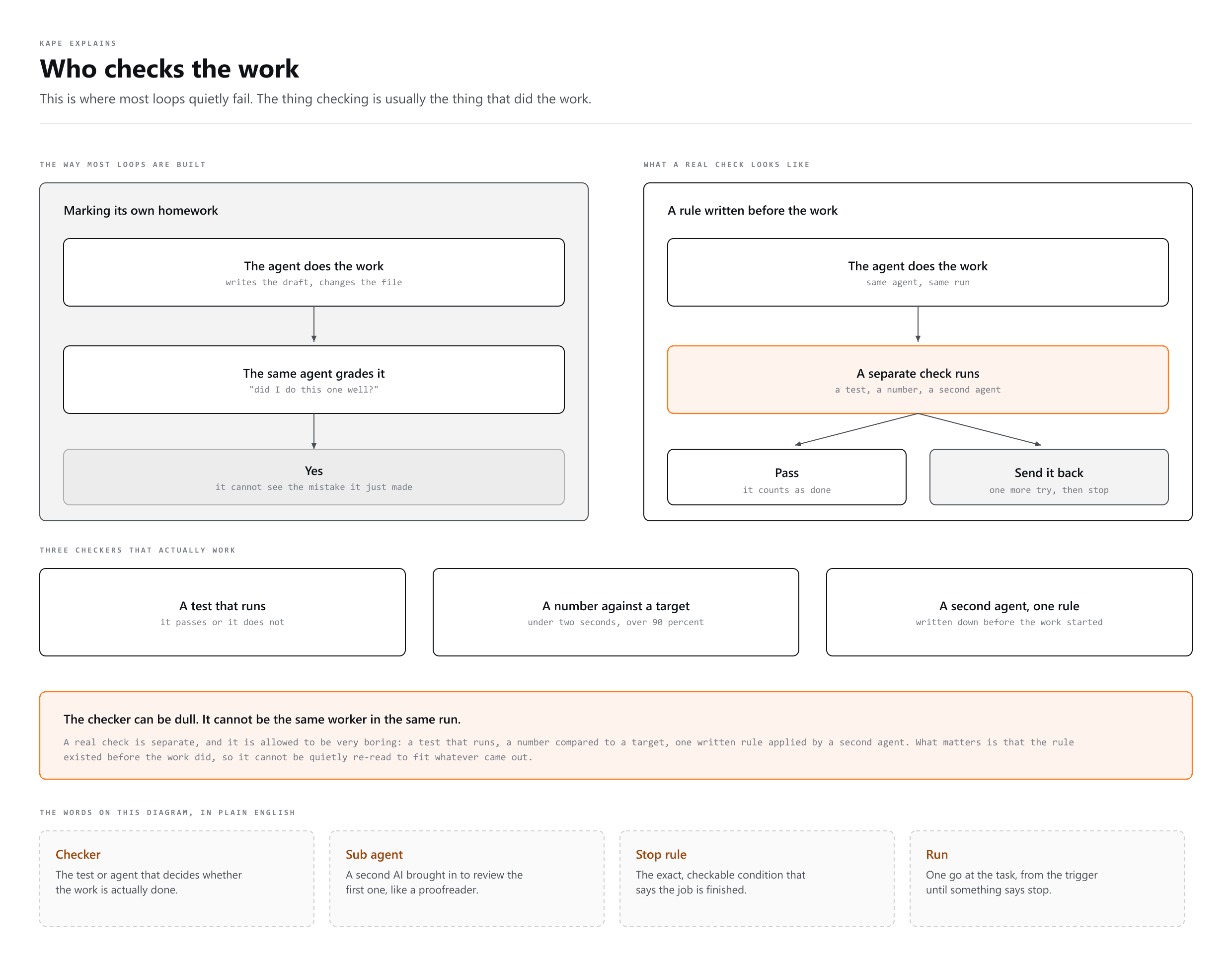
A real checker is separate, and it can be very boring: a test that runs, a number compared to a target, a second agent applying one written rule. What matters is that the rule existed before the work did, so it cannot be quietly reinterpreted to fit whatever came out.
Four brakes every loop needs
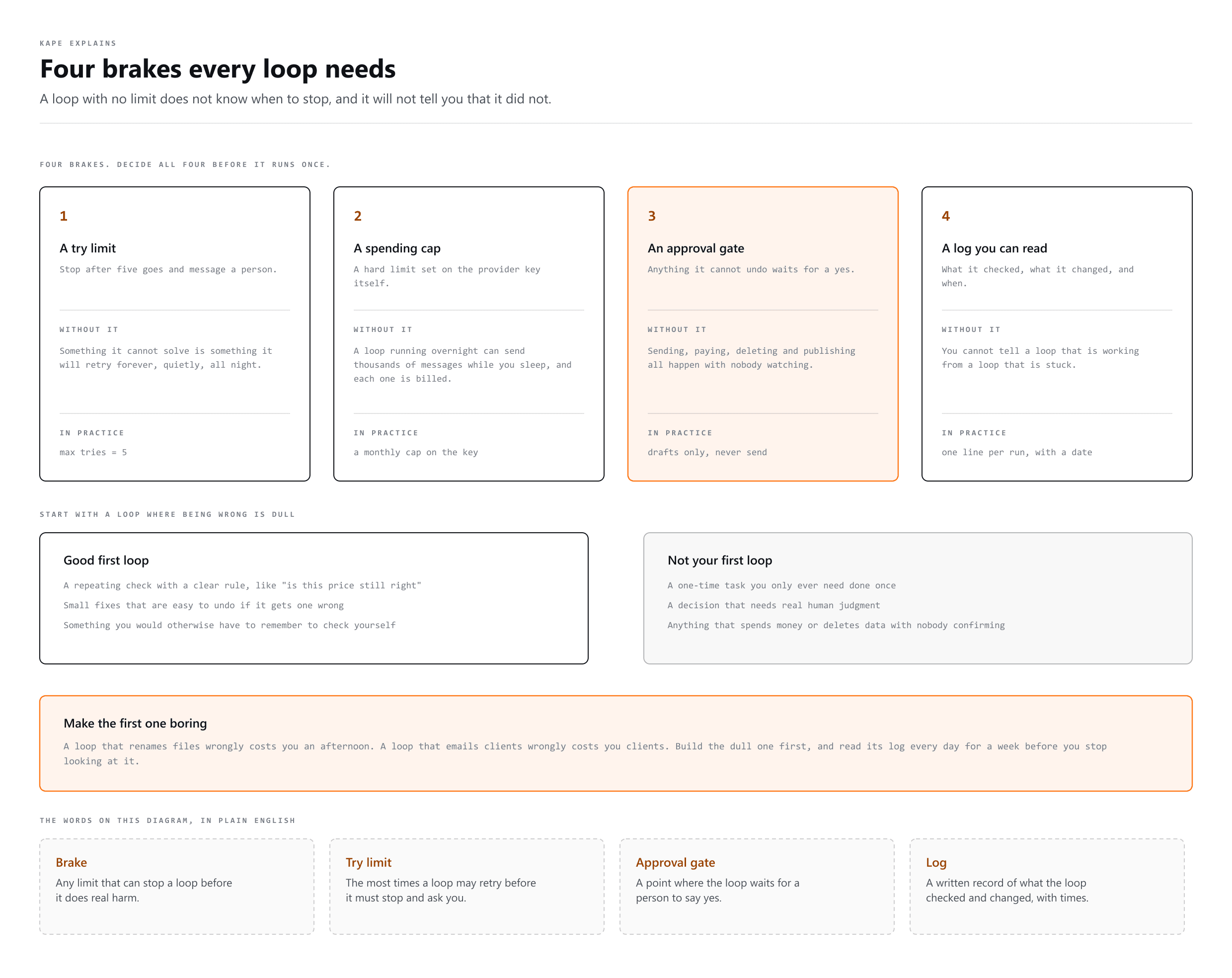
- A try limit. After five goes, stop and message a person. Something it cannot solve is something it will retry forever.
- A spending cap. A hard limit on the provider key. A loop running overnight can send thousands of messages while you sleep, and each one is billed.
- An approval gate. Anything it cannot undo waits for a yes: sending, paying, deleting, publishing.
- A log you can read. What it checked, what it changed and when. Without one you cannot tell a loop that is working from a loop that is stuck.
A real example you can picture
One builder set up an AI to run a website that shows live sports scores during a tournament. Scores change many times a day, so updating the site by asking the AI each time would mean typing the same request over and over. Instead, the builder set up a loop: check for new scores every hour, and update the site automatically when something changed. A second loop watched for bug reports from visitors and tried to fix small issues on its own. Neither loop needed a person to press go. Each one followed its own schedule and its own rule for when a fix counted as finished.
When to use a loop, and when not to
| Good fit for a loop | Not a good fit for a loop |
|---|---|
| A repeating check with a clear rule, like 'is this price still correct' | A one-time task you only ever need once, like writing a single email |
| Small, low-risk fixes that are easy to undo | A decision that needs real human judgment, like which client to prioritize this week |
| Something you would otherwise have to remember to check yourself | Anything that spends real money or deletes real data without a person confirming first |
Mistakes that break a loop
- A vague stop rule. 'Keep going until it looks good' is not something a computer can check. 'Stop when the test passes' is.
- No limit on repeats. A loop that can run forever can also waste time and money forever. Always set a maximum number of tries before it must stop and ask a person.
- No one checking the risky steps. A loop is great at small, repeatable checks. It should still stop and ask a person before doing anything that is hard to undo.
- Treating it as already proven. This idea is still new and untested at scale. Some people who build with AI every day call it mostly hype so far. Try it first on a small, safe task, not your most important system.
More words
- Prompt Engineering
Writing the instruction so the answer comes back right
- Context Engineering
Choosing what the AI gets to see while it answers
- Graph Engineering
How many AI agents connect and work as a team.