
Pi: The Bare-Bones Toolkit Behind Popular AI Coding Agents
A stripped-down AI toolkit that other AI tools are built on top of.
Pi is a small, free toolkit that developers use to build their own AI coding assistants from scratch. It gives you almost nothing out of the box on purpose, so builders can add only what they need instead of fighting with features they never asked for.
What Pi actually is
Pi is a small, free, open-source toolkit that developers use to build their own AI coding assistants. It is not something you chat with directly like ChatGPT. It is closer to a set of building blocks that a developer uses to build a finished app.
Pi became well known because a very popular AI coding tool, built by other developers on top of Pi, grew fast and pulled a lot of attention toward the toolkit underneath it. Pi itself is the quiet engine, not the flashy app people download.
The problem Pi is trying to solve
Many popular AI coding tools ship with a huge amount of built-in stuff: automatic helper agents, connections to outside apps, background tasks, to-do lists, and more. Over time, these tools start to feel very similar to each other, and all those extra built-in features become hard to remove or change later.
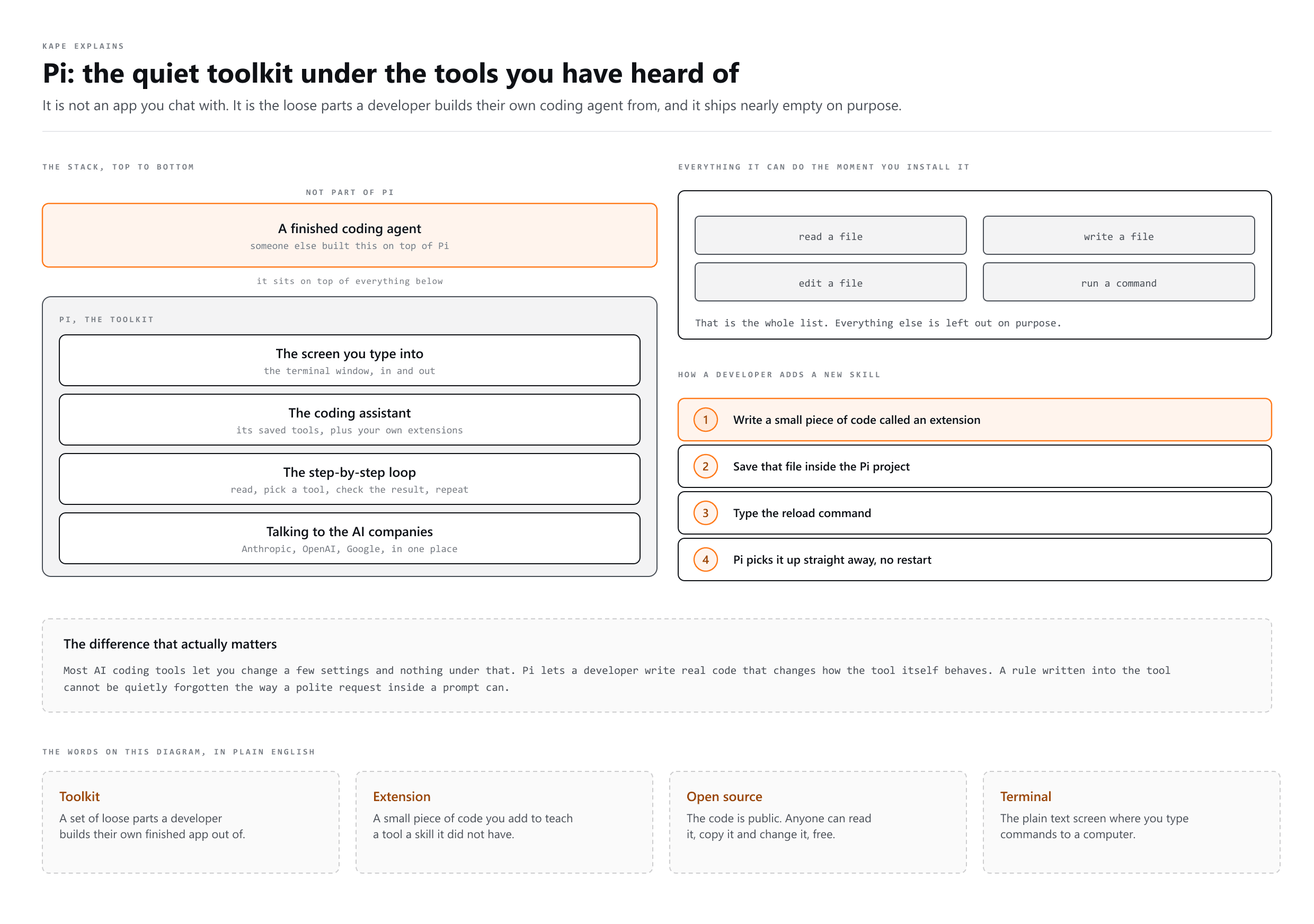
Pi takes the opposite approach. Out of the box, it only gives you four basic abilities: read a file, write a file, edit a file, and run a command in the terminal. Everything else is left out on purpose, so a developer can add only what their project actually needs.
How Pi is put together
- One part only handles talking to different AI companies, like Anthropic, OpenAI, and Google, so a developer does not have to write that messy connection code themselves.
- One part runs the step-by-step loop: the AI reads a request, picks a tool to use, checks the result, and repeats until the task is done.
- One part is the full coding assistant you would actually run, with its saved tool abilities and the ability to add extensions.
- One part is the text screen you type into and read replies from, in the terminal.
Because each part only does one job, a developer can change or add to one part without breaking the others. This is why other builders can take Pi and build a completely different app on top of it.
How a developer adds a new skill to Pi
- The developer writes a small piece of code, called an extension, that describes the new behavior they want.
- They save that extension file inside their Pi project.
- They type a reload command inside the tool.
- Pi reads the new code and starts using the new behavior right away, without needing to restart the whole program.
A freelancer example
Picture a Filipino freelancer who manages automations for a small agency. Their developer partner is building a custom AI helper for internal use. The team notices the AI helper sometimes deletes old client files without leaving any record, which makes it hard to explain later what happened.
Instead of just asking the AI nicely in a prompt to 'please remember to log deletions,' which the AI can quietly forget, the developer writes one small extension. That extension tells the tool, at the code level, to always write a log entry every time a delete happens. Because it is written into the tool itself and not just requested in words, it cannot be skipped or forgotten.
When to use it, and when not to
| Situation | Is Pi the right fit? |
|---|---|
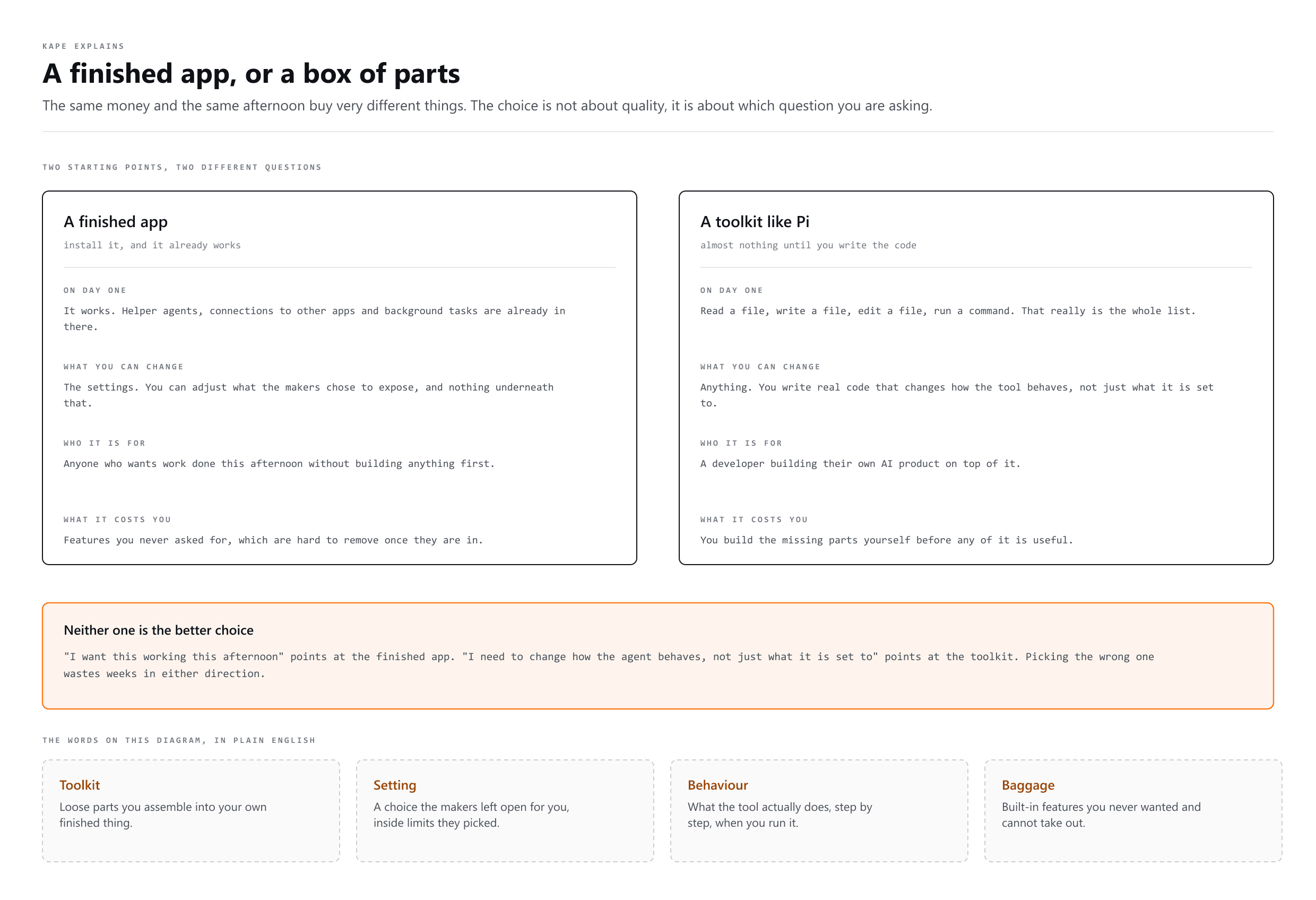
| You just want to chat with AI or ask it to write some code for you | No. Use a ready-made tool built for everyday use instead. |
| You are a developer building your own custom AI coding product | Yes. Pi gives you the base pieces so you do not build everything from zero. |
| You want a tool that already comes loaded with features | No. Pi ships with almost nothing built in on purpose. |
| You need to change how an AI agent behaves at a deep level, not just its settings | Yes. This is the main reason developers pick Pi. |
Common mistakes people make when talking about this
- Thinking Pi is a finished app you can install and start using like a normal chat tool. It is a toolkit for developers, not a consumer product.
- Mixing up Pi with the finished apps that are built on top of it. Pi is the engine underneath, not the popular app people talk about.
- Assuming that having fewer built-in features automatically makes a tool worse. For Pi, having less built in is the entire point, since it means less baggage to remove later.
More words
- Prompt Engineering
Writing the instruction so the answer comes back right
- Context Engineering
Choosing what the AI gets to see while it answers
- Loop Engineering
Teaching an AI to check on its own, no prompt needed